Firebird Schreibvorgaenge
Warum die Reihenfolge von Schreibvorgängen für Firebird so wichtig ist
Holger Klemt, September 2026
Die Zuverlässigkeit einer Firebird-Datenbank hängt nicht nur von Firebird selbst ab. Ebenso wichtig ist, dass das darunterliegende Betriebssystem und Storage-System Schreibvorgänge so ausführen und bestätigen, wie es die Datenbank erwartet.
Firebird ist darauf ausgelegt, Änderungen in einer definierten und sorgfältig abgestimmten Reihenfolge auf den Datenträger zu schreiben. Besonders bei aktiviertem Forced Writes stellt Firebird sicher, dass kritische Änderungen tatsächlich auf ein dauerhaftes Speichermedium geschrieben wurden, bevor nachfolgende Operationen als erfolgreich abgeschlossen gelten.
Caches und zusätzliche Storage-Schichten
Moderne Betriebssysteme, RAID-Controller und Storage-Systeme versuchen Schreibzugriffe aus Performancegründen zu optimieren. Schreibvorgänge können beispielsweise gesammelt, zusammengefasst oder in einer anderen Reihenfolge an das physische Speichermedium weitergegeben werden.
Das ist grundsätzlich sinnvoll und bei normalem Dateizugriff meist unproblematisch. Für ein Datenbanksystem ist jedoch entscheidend, dass sogenannte Flush- oder Synchronisationsanforderungen zuverlässig bis zum tatsächlichen Datenträger durchgereicht werden.
Kritisch können deshalb zusätzliche Schichten zwischen Firebird und dem physischen Datenträger sein, zum Beispiel:
- Host- oder Controller-Caches
- RAID- und Storage-Virtualisierung
- Cluster-Dateisysteme
- Block-Level-Replikation
- SAN- oder NAS-Systeme
- Snapshots und andere Virtualisierungsschichten
- nicht batterie- oder flashgesicherte Schreib-Caches
Das Problem entsteht insbesondere dann, wenn eine Schicht einen Schreibvorgang bereits als abgeschlossen meldet, obwohl die Daten noch nicht dauerhaft gespeichert wurden.
Was bei einem Absturz passieren kann
Bei einem Stromausfall, Kernel-Crash oder Hardwarefehler können dadurch bereits bestätigte Schreibvorgänge verloren gehen.
Besonders problematisch ist dies, wenn ein späterer Datenbankzustand bereits auf dem Datenträger angekommen ist, während dazugehörige vorherige Änderungen noch in einem Cache liegen. Dann können innerhalb der Datenbankdatei Informationen entstehen, die nicht mehr zueinander passen.
Genau die von Firebird vorgesehene Schreibstrategie soll solche Situationen verhindern. Voraussetzung dafür ist allerdings, dass Betriebssystem, Treiber, Controller und Storage die entsprechenden Synchronisations-anforderungen korrekt umsetzen.
Forced Writes abzuschalten kann deshalb zwar die Schreibperformance deutlich erhöhen, reduziert aber gleichzeitig eine wichtige Sicherheitsfunktion der Datenbank.
Linux ist nicht automatisch vor solchen Problemen geschützt
Linux-Dateisysteme wie ext4 verfügen über Mechanismen zur kontrollierten Reihenfolge und Absicherung von Schreibvorgängen. Das bedeutet jedoch nicht automatisch, dass jede darunterliegende Storage-Konfiguration dieselben Garantien bietet.
Sobald zusätzliche Cluster-, Mirror-, RAID- oder Virtualisierungsschichten beteiligt sind, muss sichergestellt werden, dass Flushes und Write Barriers auch tatsächlich bis zum persistenten Speichermedium weitergegeben werden.
Für Datenbanksysteme ist daher weniger entscheidend, ob Windows oder Linux eingesetzt wird, sondern ob die gesamte Storage-Kette die vom Datenbanksystem verlangten Garantien zuverlässig einhält.
Ein Beispiel aus der Praxis
In einem von uns betreuten Umfeld kam es vor einigen Jahren bei einem geschäftskritischen Firebird-System zu einem schweren Ausfall. Die Datenbank befand sich auf einer extern aufgebauten Linux-Cluster- und Storage-Lösung.
Nach einem Fehler waren nicht nur die produktive Datenbank, sondern auch die auf Storage-Ebene erzeugte Kopie betroffen. Die Wiederherstellung des Systems erforderte erhebliche Analyse- und Reparaturarbeiten.
Anschließend wurde die Architektur geändert. Seitdem erfolgt die Redundanz nicht mehr durch eine transparente Spiegelung der geöffneten Datenbankdatei, sondern durch eine Replikation auf Firebird-Ebene auf unabhängige Serversysteme. Diese Architektur ist dort seit vielen Jahren zuverlässig im Einsatz.
Redundanz möglichst auf Datenbankebene
Für Firebird-Systeme bevorzugen wir deshalb möglichst einfache und nachvollziehbare Storage-Strukturen.
Redundanz und Hochverfügbarkeit sollten nach Möglichkeit so realisiert werden, dass zwei unabhängig arbeitende Firebird-Server jeweils ihre eigene lokale Datenbankdatei besitzen und die Synchronisation kontrolliert auf Datenbankebene erfolgt.
Das hat mehrere Vorteile:
- Jeder Firebird-Server kontrolliert seine eigene Datenbankdatei.
- Storage-Probleme eines Systems werden nicht automatisch auf eine zweite Datenbankdatei übertragen.
- Die Anzahl zusätzlicher Cache- und Virtualisierungsschichten wird reduziert.
- Fehler lassen sich leichter analysieren und eingrenzen.
- Die für die Datenintegrität wichtigen Schreibmechanismen von Firebird bleiben erhalten.
Sicherheit und Performance sind kein Widerspruch
Die konsequente Einhaltung der notwendigen Schreibreihenfolge erzeugt zwangsläufig eine gewisse Latenz. Gerade bei sehr schreibintensiven Anwendungen kann diese deutlich messbar sein.
Diese zusätzliche Latenz ist jedoch kein unnötiger Performanceverlust, sondern ein wesentlicher Bestandteil der Transaktionssicherheit.
Bei der Optimierung eines Firebird-Servers sollte deshalb nicht versucht werden, diese Sicherheits-mechanismen zu umgehen. Sinnvoller ist es, die Hardware und Storage-Architektur so auszulegen, dass synchrone Schreibvorgänge möglichst schnell ausgeführt werden können.
Eine schnelle Datenbank benötigt schnelles Storage. Eine zuverlässige Datenbank benötigt jedoch vor allem Storage, dessen Zusagen über erfolgreich gespeicherte Daten auch tatsächlich stimmen.
IBExpertRemoteDBA
(German-language version below)
Firebird Server Health Check & Backup Monitoring
Professional baseline assessment and ongoing monitoring for Firebird 2.x-5.x – now also available for in-house or externally sourced hardware
Reliable Firebird server operation does not depend solely on the hardware used. It is also crucial to have properly configured backups, effective restore processes, a clear server configuration, and regular monitoring of key system parameters.
Until now, this service package was only available if the server hardware was purchased directly from us. It is now also available to customers who already own their hardware or purchase it from another supplier.
For a flat fee of EUR 1,750 / USD 1,990 you will receive a service package valid for 3 years.
Initial session: Assessment of the current situation
Once the order has been placed, we will hold an initial remote session together with you. During this kick-off session, we will assess your existing server and Firebird environment and review the current technical situation.
The focus is primarily on the following points:
- Review of the existing backup automation
- Monitoring of automatic restore processes
- Identification of existing errors or vulnerabilities
- Review of existing changes to firebird.conf
- Implementation of a benchmark to assess server performance
The aim is to ensure, right from the start, that the key foundations for reliable Firebird operation are in place.
Backup monitoring using an automated IBEBlock script 
A backup is only genuinely useful if it is created regularly and also checked for technical issues. That is why we implement an automated IBEBlock script to monitor the ongoing backups.
The results are recorded centrally in a log. This allows errors to be identified at an early stage, before they become a real problem in an emergency. Monitoring therefore serves not only as a means of control, but above all for the early detection of errors.

Benchmarking and evaluation of server speed
As part of the initial analysis, we also carry out a benchmark test. This provides you with a practical assessment of the server’s overall performance, enabling you to better judge whether your existing hardware is adequately configured for your Firebird installation.
Analysis of existing Firebird configurations
If your software vendor has already made adjustments to the firebird.conf file, we will assess these as well. In doing so, we will check whether the changes are justifiable and sensible, or whether they could pose potential risks to stability, performance or maintainability.
Quarterly basic checks via remote session

We carry out quarterly baseline checks throughout the three-year period. These are conducted via remote access.
We will send you an email before each check. You can then invite us to a session using the remote access software of your choice. This means you retain control over access at all times and can decide for yourself when and which tool to use to establish the connection.
Price and duration
EUR 1,750 / USD 1,990 for 3 years
This includes the initial kick-off session, the setup of backup monitoring, an assessment of the existing Firebird environment, a server benchmark, and quarterly remote health checks throughout the project duration.
Response times and optional emergency service
The IBExpert RemoteDBA Standard Service is designed as a preventive health check and monitoring service and does not include a 24/7 emergency service.
In the event of a malfunction, our standard service offers a response time on the next working day during our regular business hours from Monday–Thursday 8.00 am - 4.00 pm and Friday 8.00 am - 2.00 pm (Central European Time).
An extended 24/7/365 emergency service can be added as an option for an additional charge (100%). Alerts are sent via Signal Messenger. For this additional service, we guarantee a maximum response time of 4 hours.
The response time refers to the point at which we begin to respond to or investigate the issue, not a guarantee that the problem will be fully resolved within that timeframe.
You can place an order by email to register@ibexpert.net.

Firebird Server Health Check & Backup Monitoring
Professionelle Basisprüfung und laufende Kontrolle für Firebird 2.x-5.x – jetzt auch für eigene oder fremdbeschaffte Hardware
Ein stabiler Firebird-Serverbetrieb hängt nicht nur von der eingesetzten Hardware ab. Entscheidend sind auch korrekt eingerichtete Backups, funktionierende Restore-Prozesse, eine nachvollziehbare Serverkonfiguration und eine regelmäßige Kontrolle der wichtigsten Systemparameter.
Bisher wurde dieses Servicepaket nur angeboten, wenn die Server-Hardware direkt über uns bezogen wurde. Ab sofort steht es auch Kunden zur Verfügung, die ihre Hardware bereits besitzen oder diese bei einem anderen Anbieter kaufen.
Für einen Pauschalbetrag von 1.750 € / 1.990 USD erhalten Sie ein Servicepaket mit einer Laufzeit von 3 Jahren.
Startsession: Aufnahme der Ist-Situation
Nach Auftragserteilung führen wir gemeinsam mit Ihnen eine erste Remote-Sitzung durch. In dieser Startsession erfassen wir die vorhandene Server- und Firebird-Umgebung und prüfen die aktuelle technische Ausgangssituation.
Dabei liegt der Schwerpunkt insbesondere auf folgenden Punkten:
- Prüfung der bestehenden Backup-Automatisierung
- Kontrolle der automatischen Restore-Prozesse
- Erkennung bereits sichtbarer Fehler oder Schwachstellen
- Bewertung vorhandener Änderungen an der firebird.conf
- Durchführung eines Benchmarks zur Einschätzung der Serverleistung
Ziel ist es, schon zu Beginn sicherzustellen, dass die wichtigsten Grundlagen für einen zuverlässigen Firebird-Betrieb vorhanden sind.
Backup-Überwachung mit automatisiertem IBEBlock-Script
Ein funktionierendes Backup ist nur dann wirklich hilfreich, wenn es regelmäßig erstellt und auch technisch überprüft wird. Deshalb richten wir ein automatisiertes IBEBlock-Script ein, mit dem die laufenden Backups überwacht werden.
Die Ergebnisse werden zentral als Log erfasst. So lassen sich Fehler frühzeitig erkennen, bevor sie im Ernstfall zu einem echten Problem werden. Die Überwachung dient damit nicht nur der Kontrolle, sondern vor allem der präventiven Fehlererkennung.
Benchmark und Bewertung der Servergeschwindigkeit
Im Rahmen der Startanalyse führen wir außerdem einen Benchmark durch. Dadurch erhalten Sie eine praxisnahe Einschätzung der generellen Servergeschwindigkeit und können besser beurteilen, ob die vorhandene Hardware für Ihre Firebird-Installation angemessen dimensioniert ist.
Prüfung vorhandener Firebird-Konfigurationen
Falls Ihr Softwarehersteller bereits Anpassungen an der firebird.conf vorgenommen hat, bewerten wir diese ebenfalls. Dabei prüfen wir, ob die Änderungen nachvollziehbar und sinnvoll sind oder ob daraus mögliche Risiken für Stabilität, Performance oder Wartbarkeit entstehen können.
Vierteljährliche Basischecks per Remote-Sitzung
Während der gesamten Laufzeit von 3 Jahren führen wir vierteljährliche Basischecks durch. Diese erfolgen per Remote-Einwahl.
Vor jedem Check senden wir Ihnen eine E-Mail. Anschließend laden Sie uns mit einer Remote-Zugangssoftware Ihrer Wahl zu einer Sitzung ein. Sie behalten damit jederzeit die Kontrolle über den Zugriff und entscheiden selbst, wann und mit welchem Tool die Verbindung hergestellt wird.
Preis und Laufzeit
Der Pauschalpreis für das komplette Servicepaket beträgt:
1.750 € / 1.990 USD für 3 Jahre
Enthalten sind die initiale Startsession, die Einrichtung der Backup-Überwachung, die Bewertung der vorhandenen Firebird-Umgebung, ein Server-Benchmark sowie die vierteljährlichen Remote-Basischecks während der Laufzeit.
Reaktionszeiten und optionaler Emergency-Service
Der IBExpert RemoteDBA Standard Service ist als präventiver Health-Check- und Monitoring-Service ausgelegt und beinhaltet keinen 24/7-Emergency-Service.
Im Fehlerfall gilt für den Standardservice eine Reaktionszeit am nächsten Arbeitstag während unserer regulären Geschäftszeiten Montag-Donnerstag 8:00 - 16:00 und Freitag 8:00 - 14:00 (Mitteleuropäische Zeit).
Optional kann ein erweiterter 24/7/365 Emergency-Service gegen Aufpreis (100%) hinzugebucht werden. Die Alarmierung erfolgt dabei über den Signal Messenger. Für diesen Zusatzservice stellen wir eine maximale Reaktionszeit von 4 Stunden sicher.
Die Reaktionszeit beschreibt den Beginn der Kontaktaufnahme bzw. Analyse, nicht eine garantierte vollständige Fehlerbehebung innerhalb dieses Zeitraums.
Bestellen können Sie formlos per E-Mail an register@ibexpert.net.
Remote Firebird 4/5 Update Workshop
(German-language version below)
In successful workshops with our customers, we have perfected the solution to all conversion problems to such an extent that we can also implement your requirements quickly and flexibly via online training.
With our experience, we can support you as a user or developer to implement all the necessary steps for a successful upgrade of your Firebird 2.x-based application so that it can also run with Firebird 4 or 5.
We know how to convert your database and create a powerful Firebird 4/5 server configuration with maximum compatibility with your existing application.
Prepare your database for Firebird 4/5 compatibility
Each server-based object, for example stored procedures, triggers, UDFs etc., is automatically verified and you will receive useful tips on how to prepare your existing Firebird 2.x metadata for later conversion in the production system.
You will also receive an introduction to a new Firebird setup and learn how to install a secondary, newer parallel Firebird server version on your or your customers' database server while the existing installation is still in production.
Even rolling out an automated update to hundreds or thousands of customer installations is possible without any manual installation using our IBExpert OEM technology.
We know what can happen and our setup offers all your customers an automated upgrade. If everything has worked well, they can start working with the new Firebird database server instance.
However, if something unexpected happens, you will receive a detailed log, but the existing setup will still be available.
This allows you to decide whether a manual setup is required or whether the automated update process needs to be improved.
Test your application for Firebird 4/5 compatibility
The basic workshop lasts approx. 2 days and includes an analysis of the existing system as well as a backup/restore of all required data on the new Firebird server.
To avoid wasting time waiting for the backup/restore, we usually offer our workshops in a 4x4 hour format.
You will be surprised how quickly we can get your application up and running with the new Firebird 4/5 database as the backend.
Our setup utilises several available compatibility configuration parameters, so that you can continue to enjoy all the benefits of the new Firebird versions and achieve significantly better performance, especially under high load, in multi-user installations.
Further support
Once the conversion is complete, we can also offer customised support to create an IBExpert OEM-based upgrade module, which you can deliver to all your customers with your next update.
If your customers complain about the speed of your software, we can also train your team to use the IBExpert Benchmark, analyse the results and communicate the often very poor results to your customer, who is responsible for the hardware chosen for the Firebird server.
And finally, almost any software can benefit from a thorough examination regarding poor database design and bad SQL statements.
We can show you how to locate such issues and help you improve the performance of your software.
For an offer, please contact us with the subject "Remote Firebird 4/5 Update Workshop" with a brief description of your current products and your team: register@ibexpert.net.
Remote Firebird 4/5 Update-Workshop
In erfolgreichen Workshops mit unseren Kunden haben wir die Lösung aller Konvertierungsprobleme soweit perfektioniert, dass wir auch Ihre Anforderungen schnell und flexibel via Online-Schulung umsetzen können.
Mit unserer Erfahrung können wir Sie als Anwender oder Entwickler dabei unterstützen, alle erforderlichen Schritte für ein erfolgreiches Upgrade Ihrer Firebird 2.x-basierten Anwendung umzusetzen, sodass diese auch mit Firebird 4/5 ausgeführt werden kann.
Wir wissen, wie Sie Ihre Datenbank konvertieren müssen, um eine leistungsstarke Firebird 4/5-Serverkonfiguration mit maximaler Kompatibilität mit Ihrer bestehenden Anwendung erstellen.
Bereiten Sie Ihre Datenbank auf die Kompatibilität mit Firebird 4/5 vor
Jedes serverbasierte Objekt, zum Beispiel Stored Procedures, Trigger, UDFs usw., wird automatisch überprüft und Sie erhalten nützliche Hinweise, wie Sie Ihre vorhandenen Firebird 2.x-Metadaten kompatibel für die spätere Konvertierung im Produktionssystem vorbereiten.
Außerdem erhalten Sie eine Einführung in ein neues Firebird-Setup und erfahren, wie Sie eine sekundäre neuere Firebird-Serverversion auf Ihrem oder dem Datenbankserver Ihrer Kunden parallel installieren, während es sich noch in der Produktion mit der bestehenden Installation befindet.
Selbst die Einführung eines automatisierten Updates auf Hunderten oder Tausenden von Kundeninstallationen ist mithilfe unserer IBExpert OEM-Technologie ohne eine manuelle Installation möglich.
Wir wissen, was passieren kann und unser Setup bietet allen Ihren Kunden ein automatisiertes Upgrade. Wenn alles gut funktioniert hat, können sie mit der neuen Firebird-Datenbankserverinstanz arbeiten.
Sollte jedoch etwas Unerwartetes passieren, erhalten Sie ein detailliertes Protokoll, aber das bestehende Setup ist weiterhin verfügbar.
Somit können Sie entscheiden, ob ein manuelles Setup erforderlich ist oder der automatisierte Update-Prozess verbessert werden muss.
Testen Sie Ihre Anwendung auf Firebird 4/5-Kompatibilität
Der Basis-Workshop dauert ca. 2 Tage und beinhaltet eine Analyse des bestehenden Systems sowie ein Backup/Restore aller erforderlichen Daten auf dem neuen Firebird-Server.
Um Zeitverschwendung beim Warten auf das Backup/Restore zu vermeiden, bieten wir unsere Workshops in der Regel im 4x4-Stunden-Format an.
Sie werden überrascht sein, wie schnell wir Ihre Anwendung mit der neuen Firebird 4/5-Datenbank als Backend zum Laufen bringen.
Unser Setup nutzt mehrere verfügbare Kompatibilitätskonfigurationsparameter, sodass Sie weiterhin alle Vorteile der neuen Firebird-Versionen nutzen und insbesondere bei Mehrbenutzerinstallationen eine deutlich bessere Leistung, insbesondere unter hoher Last, erzielen werden.
Weiterer Support
Sobald die Konvertierung abgeschlossen ist, können wir auch individuelle Unterstützung bei der Erstellung eines IBExpert OEM-basierten Upgrade-Moduls anbieten, das Sie mit Ihrem nächsten Update an alle Ihre Kunden ausliefern können.
Sollten sich Ihre Kunden über die Geschwindigkeit Ihrer Software beschweren, können wir Ihr Team auch im Umgang mit dem IBExpert Benchmark schulen, die Ergebnisse analysieren und die oft sehr schlechten Ergebnisse mit Ihrem Kunden, der für die für den Firebird-Server gewählte Hardware verantwortlich ist, kommunizieren.
Und schließlich kann fast jede Software von einer gründlichen Überprüfung hinsichtlich eines schlechten Datenbankdesigns und fehlerhafter SQL-Anweisungen profitieren.
Wir zeigen Ihnen, wie Sie solche Probleme lokalisieren und helfen Ihnen, die Performance Ihrer Software zu verbessern.
Für ein Angebot kontaktieren Sie uns bitte mit dem Betreff „Remote Firebird 4/5 Update Workshop“ und beschreiben Sie uns kurz Ihre aktuellen Produkte und Ihr Team: register@ibexpert.net.
IBExpert Firebird Bootcamps:
(German-language version below)
What our customers are saying

"Thanks for a very enlightening bootcamp in Orlando, Florida. I certainly learned a lot and look forward to putting at least some of into effect with my own systems. I also now realize that I need to spend more time with ibeblock so as to be more productive."
Bruce Eglington
"The Bootcamp was a valuable learning experience for my staff and I. We have been using Firebird and IBExpert for many years, but the presenter was extremely knowledgeable and was able to offer a fresh perspective to several issues we have. Overall, it was two days and $$ well spent."
Rick Long, Spectrum Software, Inc.
"I found the IBExpert Bootcamp in Orlando to be quite elucidating, our company has been using Firebird for years and I learned that we are not using Firebird to its full potential. We have been hesitant to move from Firebird 2.5 to 3, but the techniques I was able to observe at the class convinced me to move ahead with beginning the upgrade process with the assistance of IBExpert Developer Studio. I also learned methods that will greatly enhance our ability to support our clients across the globe. Thanks for the great experience!"
Roark Sheehan
"I found the 2-day IBExpert Bootcamp to be very helpful and informative. The built-in IBExpert benchmark tool will be very useful in evaluating our client’s hardware ability to efficiently host a Firebird database. The information presented during the Bootcamp will also help us during our transition from Firebird 1.5/2.5 to Firebird 3.0. Holger and Christian are very knowledgeable in Firebird techniques and optimization strategies and I would highly recommend their services."
Kenneth Severud, BuilderMT
"The Firebird Admin Bootcamp was very informative, being able to sit down to better understand the behind-the-scenes of Firebird and IBExpert is well worth the investment. I can now better utilize the software and tools to help with managing and providing recommendations to our clients."
Roger Long, BuilderMT
"This being my first IBE event I did not know what to expect, but it did exceed expectation as compared to other in-depth trainings I’ve attended. ... I absolutely would recommend the HK software team!"
Dustin Waling, BuilderMT
"In the Bootcamp I received a lot of important information to improve the performance of our applications and the replication between servers in Firebird, I'm sure our customers will receive the benefits of these new tips and information. It is definitely a worthwhile investment.”
Ing. Pedro Fernando Pardo R., Software y Servicios Informáticos Ltda
"I wanted to thank you for the past 2 days training. It was been a pleasure meeting you and really really educational training. It was a lot of material covered and I look forward we can work together soon."
Eduardo Rocha, Avatar Solutions
"Three days pure Firebird: Firebird internals, Firebird replication, Firebird configuration, repairing Firebird, optimizing Firebird, basically: all things Firebird. It's not possible to pack more Firebird theory and practice into three days!
"The very next day, following the recommendations, we set about configuring a new PC as a Firebird server, initially without any software optimization: a LIKE search across all data by customer name previously took about 15 seconds, with the new server 2 seconds. Price of the previous server: 3,500 €, price of the new FB-Server PC: 1,000 €.
"We will need a few months to digest it all, and implement other parts of our newly gained knowledge. Thanks for the video recordings; they help enormously!"
Chris Hölzemann, Jürgen Medart, Ingenieurbüro Medart
"We would like to thank you for an excellent workshop. We've really learnt a lot about Firebird and IBExpert. The following topics were particularly important for ourselves: transaction control und error detection; Firebird database replication; shadows; developing Client/Server apps; hardware recommendations and Firebird server configuration; upgrade to Firebird 3.0 and the advantages compared to Firebird 2.5.
"PS: This was by far the best workshop I've ever participated in!"
Jakob Töws, Tele-Trac Kommunikations GmbH
"The Bootcamp was, as was my previous participation in several IBExpert courses or workshops, very informative. Customer projects that I have implemented and which have been in use for a long time (replication, archive database, log triggers, etc. ...), can now be extended and optimized even further on the basis of the newly acquired knowledge.
"Working with IBExpert is continually improved, thus I can develop much faster in the database and integrate these improvements in customer projects and also in our ERP software.
"Holger Klemt also constantly offers tips, advice and guidance based on his very long experience, among other things: what should be taken into consideration when implementing customer requirements, so that you can avoid a variety of "beginner mistakes" from the outset, which would otherwise make life very difficult later.
"Participation in IBExpert workshops is firmly fixed in my schedule every 1-2 years."
Michael Clemens, Line Software GmbH
Further information: IBExpert Firebird 3 Bootcamp
Interested? Please mail register@ibexpert.net and we will send you our written offer.
Should you prefer a different selection of topics, that is not a problem: Just ask us - Anything that is possible, we are happy to do!
Request our written quotation: register@ibexpert.net.
IBExpert Firebird Bootcamps:
Was unsere Kunden sagen

"Gefallen hat uns der Praxisbezug und Beispiele aus dem echten Leben. Dass man hinterher noch die Filmaufnahmen in Händen hält, ist extrem hilfreich."
Name der Redaktion bekannt
"Ohne überflüssigen Ballast hat Holger Klemt mal wieder in leicht verständlicher Form aus der Praxis für die Praxis referiert. Die zuvor angekündigten Themen wurden vollständig abgearbeitet. Das Beste ist aber -wie eigentlich immer bei Schulungen des Hauses IBExpert-, dass uns die Werkzeuge und deren Handhabung in schnell fasslicher Form erläutert wurden, so dass wir alle angesprochenen Themen in Ruhe selbst noch einmal durcharbeiten können. Der Referent hat die Fachtermini in leicht verständliche Formen gebracht, Zusammenhänge, Widersprüche und Schlussfolgerungen für die Praxis aufbereitet. Besonders hilfreich hierbei auch, wie der Bogen von der Datenbankprogrammierung und -administration über Betriebssystemfragen bis hin zu Fragen der Hardware gespannt wurde.
"Mag der Vergleich auch hinken, aber m.E. glich das Bootcamp dem von uns verwendeten Datenbankserver: kurz, knackig und hochperformant. Preis-Leistungs-Verhältnis: Ausgezeichnet! Man geht definitiv mit mehr nach Hause als man investiert hat."
Jürgen Henze, Ingenieurbüro Höhnsch
"Da dies mein erstes IBEEvent war, wusste ich nicht genau, was ich zu erwarten hatte, aber es übertraf alle Erwartungen im Vergleich zu anderen eingehenden Trainings, die ich bisher besucht habe. ... Ich würde das HK-Softwareteam jederzeit weiterempfehlen!"
Dustin Waling, BuilderMT
"Beim Bootcamp erhielt ich eine Menge wichtiger Informationen, um die Leistung unserer Anwendungen und die Replikation zwischen Servern in Firebird zu verbessern, ich bin sicher, dass unsere Kunden die Vorteile dieser neuen Tipps und Informationen schätzen werden. Es ist definitiv eine lohnenswerte Investition."
Ing. Pedro Fernando Pardo R., Software y Servicios Informáticos Ltda
"Ich möchte mich für die letzten 2 Tage Training herzlich bedanken. Es war ein Vergnügen, Euch kennen zu lernen und es war wirklich ein pädagogisch wertvolles Training. Viel Material wurde umfassend behandelt, und ich freue mich darauf, dass wir bald zusammenarbeiten können."
Eduardo Rocha, Avatar Solutions
"Drei Tage Firebird pur. Firebird intern, Firebird replizieren, Firebird konfigurieren, Firebird reparieren, Firebird optimieren, einfach alles rund um Firebird. Das waren 3 Tage voller Theorie und Praxis rund um Firebird, mehr geht nicht!
"Direkt am nächsten Tag haben wir uns entsprechend der Empfehlungen einen neuen PC als Firebird-Server konfiguriert. Ergebnis, noch ohne jede Software-Optimierung: Like-Suche nach Kundennamen über alle Daten dauerte bisher ca. 15 Sekunden, mit dem neuen Server 2 Sekunden. Preis bisheriger Server: ca. 3500 €, Preis neuer Firebird Server-PC: ca. 1000 €.
"Wir haben noch einige Monate zu tun, um das alles zu verdauen – sprich weitere Teile davon umzusetzen. Danke für die Aufzeichnungen, die dabei enorm helfen!"
Chris Hölzemann, Jürgen Medart, Ingenieurbüro Medart
"Wir möchten uns für die sehr gute Schulung bedanken. Wir haben viel neues über Firebird und IBExpert gelernt. Für uns waren folgende Themen besonders wichtig: Transaction Kontrolle und Fehlersuche; Replizierung von Firebird Datenbanken; Shadows; Entwicklung von Client/Server Anwendungen; Hardware Empfehlung und Konfiguration eines Firebird Servers; Umstellung auf Firebird 3.0 und seine Vorteile gegenüber Firebird 2.5.
"PS: Das war mit Abstand die beste Schulung an der wir bis jetzt teilgenommen haben!"
Jakob Töws, Tele-Trac Kommunikations GmbH
"Das Bootcamp war, wie meine bisherige Teilnahme an diversen IBExpert Schulungen oder Workshops auch, sehr aufschlussreich. Lösungen, die ich beim Kunden schon sehr lange im Einsatz habe (Replikation, Archivdatenbank, Logtrigger, usw. …), kann ich nun anhand der neuen Informationen noch erweitern und optimieren.
"Das Arbeiten mit IBExpert wird immer weiter verbessert, dadurch kann ich sehr viel schneller in der Datenbank entwickeln und diese Verbesserungen bei Kundenprojekten und auch in unsere ERP Software einbinden.
"Holger Klemt gibt auch immer wieder Tipps, Ratschläge und Hinweise aus seiner sehr langen Erfahrung, u.a. was bei Kundenanforderungen beachtet werden sollte, damit man von vorneherein nicht diverse „Anfängerfehler“ macht, die einem nachher das Leben sehr schwer machen.
"Die Teilnahme an IBExpert Workshops ist alle 1-2 Jahre fest in meinem Terminplan enthalten."
Michael Clemens, Line Software GmbH
Weitere Information: IBExpert Firebird 3 Bootcamp
Bei Interesse mailen Sie bitte register@ibexpert.net und wir senden Ihnen gerne unser schriftliches Angebot.
Sollte die von ihnen gewünschte Themenauswahl nicht dabei sein, kein Problem: Fragen Sie uns einfach - Alles was möglich ist, machen wir!
Angebot anfragen: register@ibexpert.net.
IBExpert Benchmark
The current version was released in January 2026.
The Net Test executes 2000 inserts to a table with 100 columns and sends all params from client to the server in individual params, so this function will create a few hundred thousand very small TCP IP packages over the network and the total time is measured by how many operations were done within each second.
A good value on fast networks should have around >=400 IOPs. If it is much slower, you should ask your network support to check the speed of components used.
It is not part of the calculated percentage result values, and also the time it takes is not used there, since these result values use minimal network traffic to measure the server speed and not the network speed.
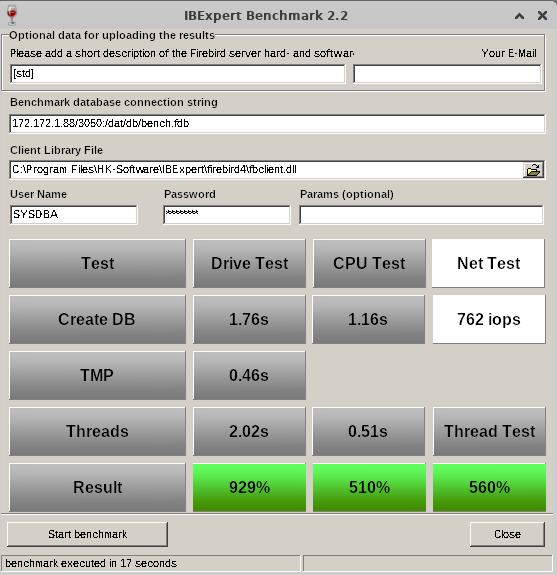
Benchmark results on an IFSLR Server using Ubuntu Linux 22 and Firebird 5
Compare your server's performance to our IFS servers!
How do you measure the performance of your own server or your clients'? Have you ever tried to compare the database speed of your Firebird server with new server hardware? Is a XEON Machine better than an Opteron? What improvements can you expect from fast SAS hard disks, RAID controllers or Enterprise SSDs?
This simple but effective tool gives you a reference benchmark, based on our recommended IFS Servers. Using IBExpert Benchmark you can generate and compare a reproducible speed index for your Firebird Server hardware. On average, our IFS servers with Firebird are 5 to 10 times faster than the server or virtual machines that our customers have previously used.
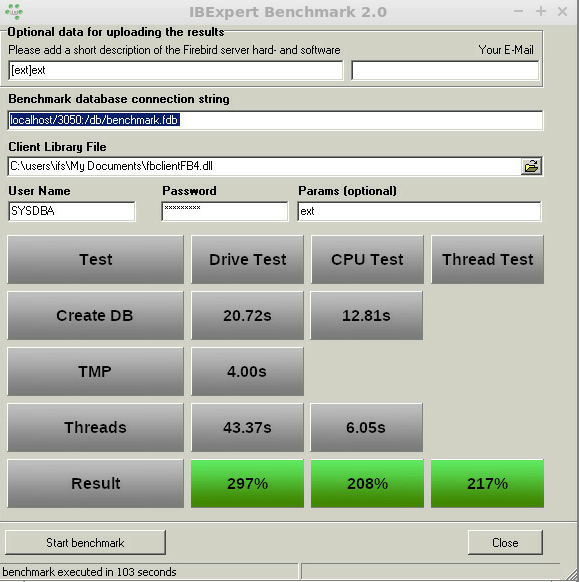
Benchmark (extended) results using Firebird 4.0 on an IFSML Server
To perform the IBExpert Benchmark at your customers and also take advantage of the extended and XXL benchmarks, you can use either the IBExpert Developer Studio customer version or the IBExpert Day Edition. To perform standard benchmarks locally, you may use our Free IBExpert Benchmark Tool.
Free IBExpert Benchmark Tool
You can use the IBExpert Benchmark Tool free of charge on any Windows computer. This limited special version allows standard benchmarks to be performed locally and includes Firebird 2.5, 3.0 and 4.0 versions, executed in application mode, so you do not need to install Firebird on the server to be tested.
The Benchmark Tool is quick and easy to use: download it here: https://ibexpert.net/benchmark/setup_benchmark.exe, install it on the drive that you want to test.
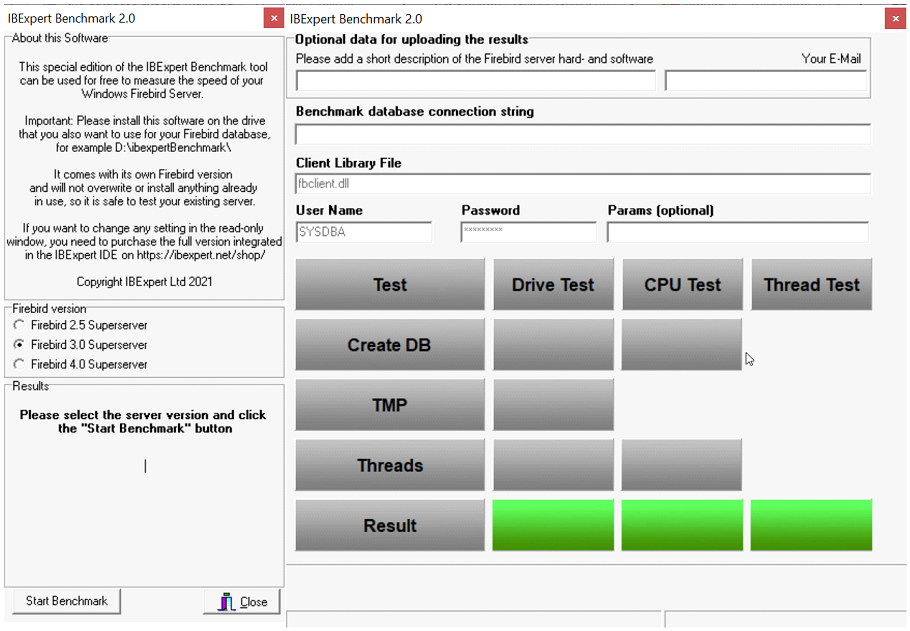
Since September 2021 the benchmark now uses the latest Firebird versions 2.5.9 and 3.0.7, and can also use Firebird 4.0.0 with the 32K page size. IBExpert Benchmark 2.0 was released on 17th November 2021.
The Benchmark Tool tests 10 parallel running threads.
Running the benchmark will not overwrite any programs already in use, nor does it install anything, so you can safely run the benchmark on your server. The IBExpert Benchmark Tool does not use an existing Firebird installation and will only test the drive on which it is installed.
Select the Firebird version you wish to use for your benchmark in the left-hand panel: Firebird 2.5 Superserver, Firebird 3.0 Superserver or Firebird 4.0 Superserver. The selection in this free version has been limited so that even users with no Firebird knowledge or experience can easily perform this quick benchmark test.
The right-hand window in this free version is read-only. (In the paid version you can enter any and all of this information, e.g. define your own connection string and client library file).
Start the benchmark by clicking Start Benchmark in the bottom left-hand corner.
Important: you will need to install and run this as Admin.
Note: Should you receive an error message, please download and install the current version.
The benchmark process and results are explained below under How does it work?
If you would like a more flexible version of our Benchmark, which allows you to change various test options, test multiple drives, various Firebird instances or even perform a benchmark on a Linux operating system or remote servers, you should use the following Benchmark, included in all IBExpert customer version IDEs.
IBExpert Developer Studio Benchmark
This version offers standard, extended and XXL benchmarks, which can be performed on the Firebird 2.5 Superserver, Classic server, Superclassic server or Firebird 3.0 and Firebird 4.0 32- or 64-bit, Windows, Linux etc. either locally or remote. The Benchmark software is implemented as a 32-bit Windows software, but it can connect to any remote Firebird installation.
If you wish to collect the results for comparison with different hard and software combinations, enter a brief description of the configuration to be tested, along with the recipient email address for the statistic report.
Benchmark (extended) results using Firebird 4.0 on an IFSML Server
Then add the required database connection information - you need to set a new path for the newly generated database; if you specify the path of an existing database, you will receive a warning message:
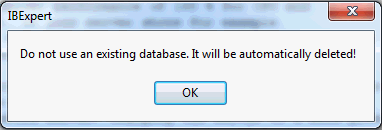
Specify the Firebird client, as well as the user name and password (the standard SYSDBA and masterkey). Finally click Start benchmark to run the benchmark test.
IBExpert now creates the demo database, which always follows the same guidelines. It then executes the INITALL procedure in this database. Following this parallel threads are created, which attempt to input further orders into the database. Following the Drive Test, the CPU Test test then is executed.
The results are displayed in the lower window: the drive and the CPU index are percentage index values comparing to our our IFS Server v. 6.0 series, which we rated at the time at 100%.
If you have specified an email address, you will receive the results by mail, with the heading as specified in the Please add a short description of the Firebird server hard- and software field.
How does it work?
Based on a demo database, which is created automatically, the standard benchmark, which is also included in the Free IBExpert Benchmark Tool, runs approximately 8 million operations (individual insert/update/delete/select statements) using 10 simultaneous processes in 2 runs on databases created with different parameters to demonstrate the impact of the physical drive speed.
The extended benchmark uses 50 parallel processes (simulating 50 concurrent users) and the XXL benchmark simulates 250 concurrent users with its 250 simultaneous processes.
Drive Test
The Drive Test is simply creating a benchmark database from a script. Within the Drive Test we changed the value of the so-called cache buffers (DefaultDBCachePages in firebird.conf) to 50, the smallest value possible. Then a stored procedure is executed inside the database to generate a lot of test data. In the Drive Test approximately 850,000 operations (i.e. INSERT, UPDATE, DELETE, SELECT statements) are carried out. This really measures the speed of the drive, because of the low-level of cache that is being used, is responsible for making a lot of I/O operations on the external drive.
- Create DB - shows the time in seconds that it takes to create the Demo database.
- TMP - Temporary file management that is used when for example, Firebird does not have any indices, which it can use, or it needs to perform some GROUP BY, HAVING or similar instructions.
- Thread test - this is the multi-threaded test. If you have for example a test on this machine, and you have 1 thread or 10 threads running, you will also see this running in the Task Manager. This can result in huge differences on different machines.
- Result - the basic value that is calculated here displays the combined results of the drive test, and we compare this value to a server that was distributed by ourselves around 2010 which had 100% speed. In reality, when you test on typical customer machines, especially in virtual environments, you will often see values of as little as 30%. Typical values are often in the range of 100%-150%.
CPU Test
This category calculates the percentage value for multi-threaded CPU tests with 5000 pages cache result to better see the advantages when using Firebird 3. This means that it no longer needs any operations on the disk. You will see a much faster result. The Thread Test, the multi-threaded line - with this one 10 parallel threads are always executed, which means it generates several thousand new orders inside the Demo database simultaneously. The Threads value here is the most important value, when you later have to check whether the server is really fast. Only this Threads value is recalculated to the Thread Test.
Thread Test
The Thread Test simply we take the CPU Test / Threads value and recalculate it. Thread Test simply means that we take the CPU Test / Threads value and compare it to the original machine. This machine is compared to our original machine as an index value.
How do your results compare?
Compare your server's performance to our IFS servers! This simple but effective tool gives you a reference benchmark, based on our recommended IFS Servers.
Our servers will show you a typical Firebird 2.5 Superserver performance of at least 200% for the CPU and at least 200% for the HDD Test with our IFS server series), und using Firebird 3.0 at least 230% for the CPU and at least 500% for the HDD Test. Results under 100% indicate an outdated server performance.
Important: This benchmark gives you a value to compare several hardware or software configurations running the Firebird server.
You will notice a huge performance increase, when comparing a Windows environment mit a Linux environment on the same hardware. This is partially due to the Windows NTFS file system, which is standard on Windows.
If, for example, you want to restart the Benchmark, especially on virtual machines, we always recommend executing this Benchmark several times, because sometimes when you execute it again, you can achieve better or worse values. This can happen because other jobs are being executed by the virtual machine host.
If the results are poor, click in the results window. You will be automatically redirected to our homepage. Here you can view our current offers for our really fast IFS Firebird servers.
Changing the server to a more powerful hardware might improve the speed by 100%. Additionally optimizing your software and database operations can often improve the speed by more than 1000%. Ask register@ibexpert.net for further support.
Software Subscription expired over 12 months
The following telephone conversation took place in August 2022 in the IBExpert Office:
Customer: I would like to move my IBExpert to another computer, how do I do that please?
IBExpert: The software subscription of your IBExpert Download Center account expired in May 2021 and moving to a new or different machine is only possible as long as your software subscription is valid.
Customer: That's now 15 months. Well, if I divide the price of a full version (currently 259 euros) by 12 months and then add this amount to the 15 months, it costs over 320 euros. Better to buy a new full version.
IBExpert: If your software subscription has expired for more than 12 months, it does not cost more than 320 euros, but currently 259 euros.
Customer: That's the same price as a new full version!
IBExpert: In this case, buying a new full version is not an advantage if you only want to use one version of the IBExpert Developer Studio Edition. A new version only makes sense if you want to increase your activations, because you want to activate IBExpert on additional hardware or for additional users. Without a valid software subscription, you will not receive any software updates or version upgrades with new functions. No personalized technical support to be able to move the IBExpert software to new hardware if necessary. Renewing your software subscription now and then every year after receiving our regular reminders gives you everything you need and saves you time and money.